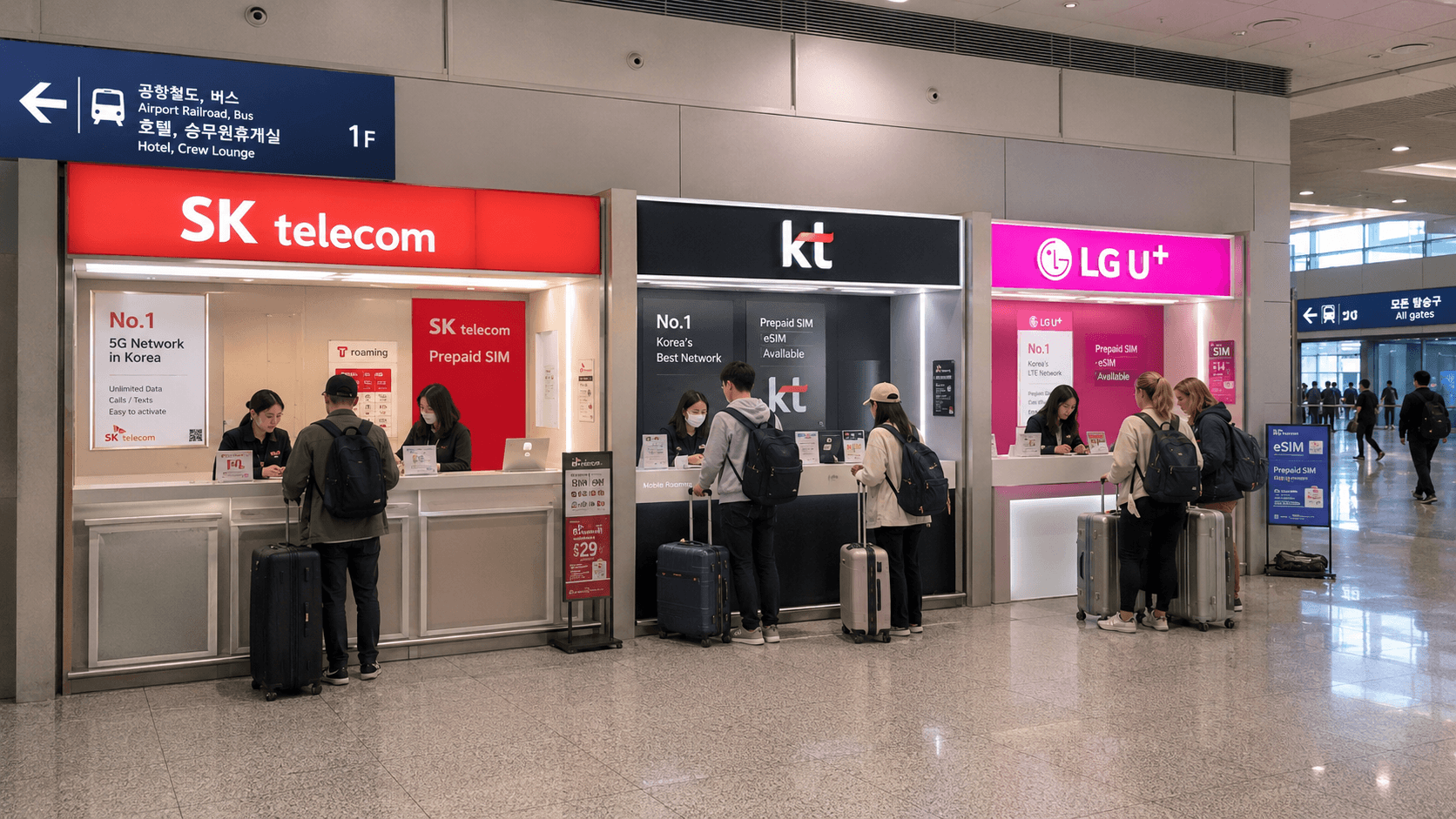
You can buy a Korean tourist SIM card after entering the public arrivals hall at either Incheon Airport terminal. SK Telecom, KT, and LG U+ operate official counters, including 24-hour locations. Bring your passport and an unlocked phone, and ask the staff to activate and test the SIM before you leave the counter.
All counter locations, opening hours, and sample prices below were verified on June 9, 2026. Airport facilities and mobile plans can change, so check the linked official pages shortly before departure.
Quick answer
| Arrival terminal | 24-hour counters | Location |
|---|---|---|
| Terminal 1 | SK Telecom, KT, LG U+ | First-floor arrivals hall, west side, near Arrival Hall F |
| Terminal 2 | KT and LG U+ | First-floor arrivals hall near Exit 4 |
| Terminal 2 | SK Telecom | First-floor arrivals hall near Exit 7 |
These counters are in the public area after immigration, baggage collection, and customs. Follow signs for Roaming Center, SIM, or the carrier names SKT, KT, and LG U+.
If you are only transferring between international flights without entering South Korea, you normally cannot reach the public arrivals counters. Arrange an eSIM or international roaming before traveling instead.
SIM card counters in Terminal 1
The easiest 24-hour location
The most convenient option for late-night and early-morning arrivals is the group of 24-hour carrier counters near Arrival Hall F on the west side of Terminal 1's first floor:
- SK Telecom: 24 hours; telephone 02-6343-9000
- KT: 24 hours; telephone 02-2190-0901
- LG U+: 24 hours; telephone 02-3416-7010
The locations and hours are listed in the Incheon Airport facilities directory.
Terminal 1 also has carrier counters near Arrival Hall A, generally operating during daytime and evening hours. Unless the Hall A counter is directly in front of you, the 24-hour Hall F area is the more dependable place to look.
How to find the counter
- Complete immigration.
- Collect your checked luggage.
- Pass through customs into the public arrivals hall.
- Check whether you entered near Arrival Hall A, B, C, D, E, or F.
- If necessary, walk west through the arrivals hall toward Hall F.
- Look for the illuminated SK Telecom, KT, or LG U+ signs.
You do not need to go upstairs to the departures floor. Some carriers have departure-side counters, but the first-floor arrivals counters are intended for incoming travelers.
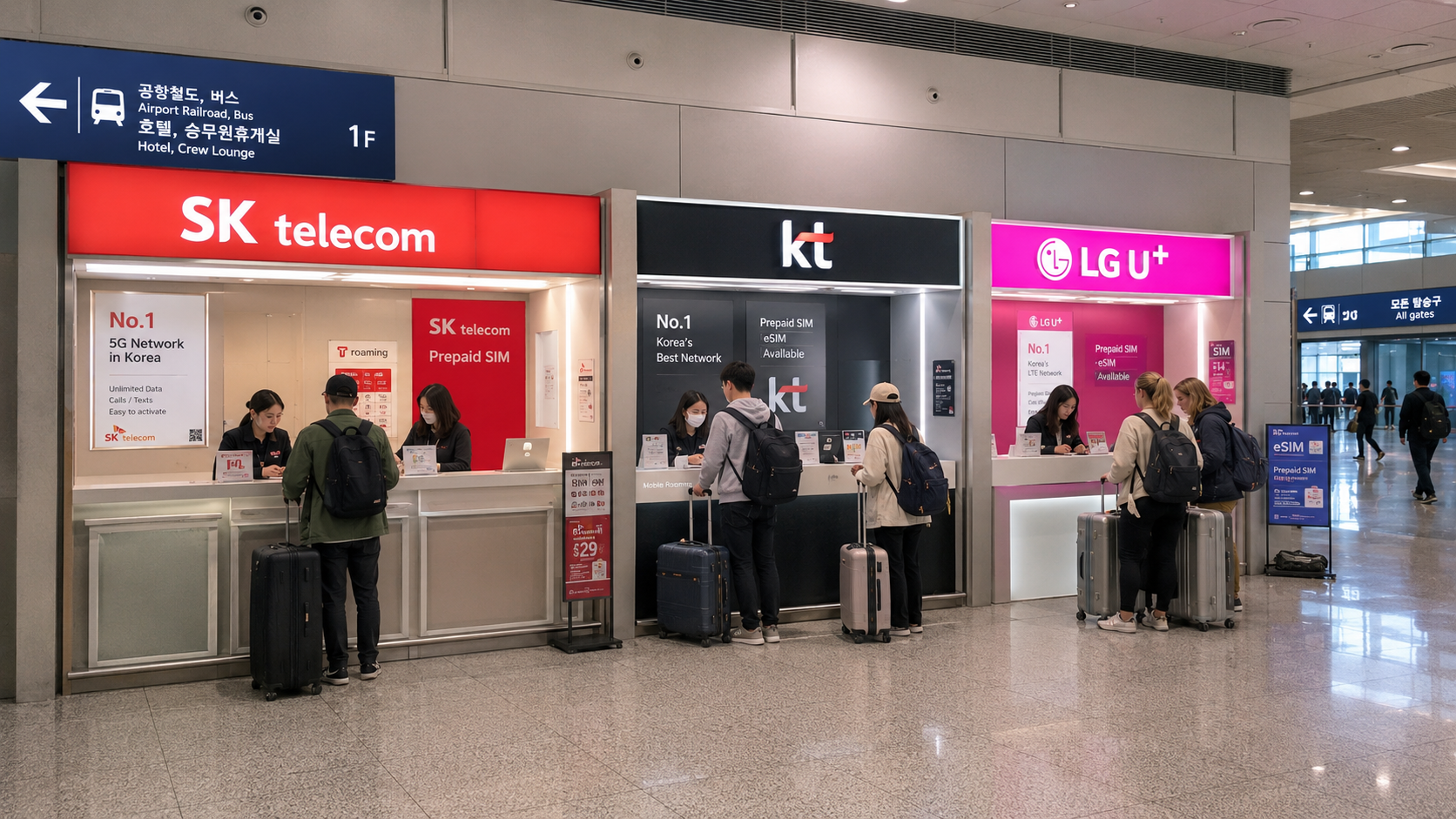
SIM card counters in Terminal 2
Terminal 2 has two main 24-hour areas for arriving travelers:
- KT and LG U+: First-floor arrivals hall near Exit 4
- SK Telecom: First-floor arrivals hall near Exit 7
The current Incheon Airport Terminal 2 directory lists all three counters as open 24 hours.
Exit numbers refer to the landside doors leading from the terminal building to the curb. After customs, remain inside the first-floor public hall and follow the overhead exit-number signs. Exit 4 and Exit 7 are within walking distance, but travelers with large luggage may prefer the nearest carrier.
Do not assume your airline always uses the same terminal. Incheon Airport advises passengers to confirm the actual terminal on their ticket or with the airline because assignments can change, including for codeshare flights. The airport's arrival procedures page provides the current general terminal guidance.
Can you buy a SIM without reserving?
Yes. You can normally walk up to an official carrier counter and buy an available tourist SIM. LG U+, for example, explicitly states that advance booking is not required on its official tourist SIM page.
A reservation can still be useful when:
- You want a specific data-and-voice package.
- An online promotion is available.
- You are traveling during a busy holiday period.
- You want to compare the exact conditions before landing.
- You need several SIM cards for a family or group.
When reserving, select the correct terminal and pickup date. Save the reservation number or confirmation QR code somewhere available offline. A screenshot is safer than relying on airport internet access while standing at the counter.
What to bring
Passport
Bring your original passport, not only a photograph or photocopy. Tourist SIM registration is tied to the user's identity. The English name used for an online reservation should match the passport.
An unlocked phone
Your phone must be carrier-unlocked, sometimes described in Korea as country-unlocked. A phone locked to your home mobile provider may reject a Korean SIM even if it supports the correct network technology. LG U+ advises travelers to ask their home carrier to remove any lock before arriving, as explained in its SIM compatibility guidance.
Check the lock status before departure. Airport staff cannot remove a lock imposed by an overseas carrier.
A payment card
Carry an internationally enabled credit or debit card. Payment and verification requirements differ by product, particularly when renting a pocket Wi-Fi router or phone rather than purchasing a disposable SIM. It is sensible to carry more than one payment method and confirm the final KRW amount before paying.
Your current SIM-removal tool
Counters usually assist with installation, but having your own SIM pin is useful later. Store your original SIM securely; it is small and easy to lose after a long flight.
How much does an airport SIM cost?
Prices depend mainly on the number of days, whether outgoing calls are included, and whether the plan is LTE or 5G. Verified June 9, 2026, the published KT and LG U+ tourist data rates included the following common options:
| Validity | Published price |
|---|---|
| 1 day | KRW 6,500 |
| 2 days | KRW 12,000 |
| 3 days | KRW 18,000 |
| 5 days | KRW 27,500 |
| 7 days | KRW 35,000 |
| 10 days | KRW 38,500 |
| 30 days | KRW 71,500 |
These are reference prices, not a guarantee that every carrier or counter will offer an identical package. KT lists its current durations and rates on the official KT tourist SIM page, while LG U+ publishes its options on the official LG U+ SIM page. SK Telecom prices and promotions can be checked through the official SK Telecom roaming site.
Ask these questions before paying:
- When does the validity period begin?
- Is the period measured in 24-hour blocks or calendar days?
- How much high-speed data is included each day?
- What speed applies after the high-speed allowance is used?
- Can the phone receive calls and SMS messages?
- Are outgoing domestic calls and texts included or charged separately?
- Can the plan be extended online?
- Is tethering or hotspot use permitted?
For example, some official tourist products provide 3GB at full speed each day and then continue at up to 5Mbps. Other products advertise unlimited data under different speed-management conditions. Read the specific plan description rather than relying only on the word unlimited.
Data-only versus data and voice
A data-only plan is sufficient for maps, translation, web browsing, messaging apps, and internet-based calls. However, it may not let you make ordinary telephone calls or send SMS messages.
A plan with a Korean 010 mobile number is more useful when you need to:
- Give a local contact number to a hotel or tour operator.
- Receive ordinary calls or text messages.
- Contact restaurants, drivers, or local services that do not use messaging apps.
- Receive simple SMS codes from services that accept tourist numbers.
A tourist number does not necessarily support Korean legal identity verification, called bonin injeung (본인인증). This stronger verification system is used by banks, government websites, and some Korean online platforms. Official KT and LG U+ information warns that tourist SIMs may receive ordinary texts but cannot be used for full identity authentication.
Exchange students and new residents should therefore treat an airport tourist SIM as a temporary connection. If you will live in Korea, ask your university, employer, or carrier about changing to a resident plan after receiving the appropriate Korean residence documentation.
Physical SIM or eSIM?
Choose a physical SIM if your phone lacks eSIM support, you want staff to install it, or you prefer to leave the airport with a tested connection. Remember that replacing your home SIM can interrupt access to your usual telephone number unless your phone supports two active SIMs.
Choose an eSIM if your phone supports it and you want to keep the physical SIM slot available. An eSIM can often be purchased before arrival, but you must confirm that the exact phone model supports eSIM and is unlocked. Do not delete an installed travel eSIM casually: some carrier QR codes cannot be reused or reissued.
Official LG U+ and KT eSIM products require passport information and have activation deadlines. Review the provider's instructions before purchase rather than installing the plan for the first time while rushing to catch an airport train.
Step-by-step purchase and setup
- Tell the staff your trip length. Include your departure date and time so they can calculate the correct validity period.
- Explain whether you need calls. Say clearly whether data alone is enough or whether you need outgoing calls and SMS.
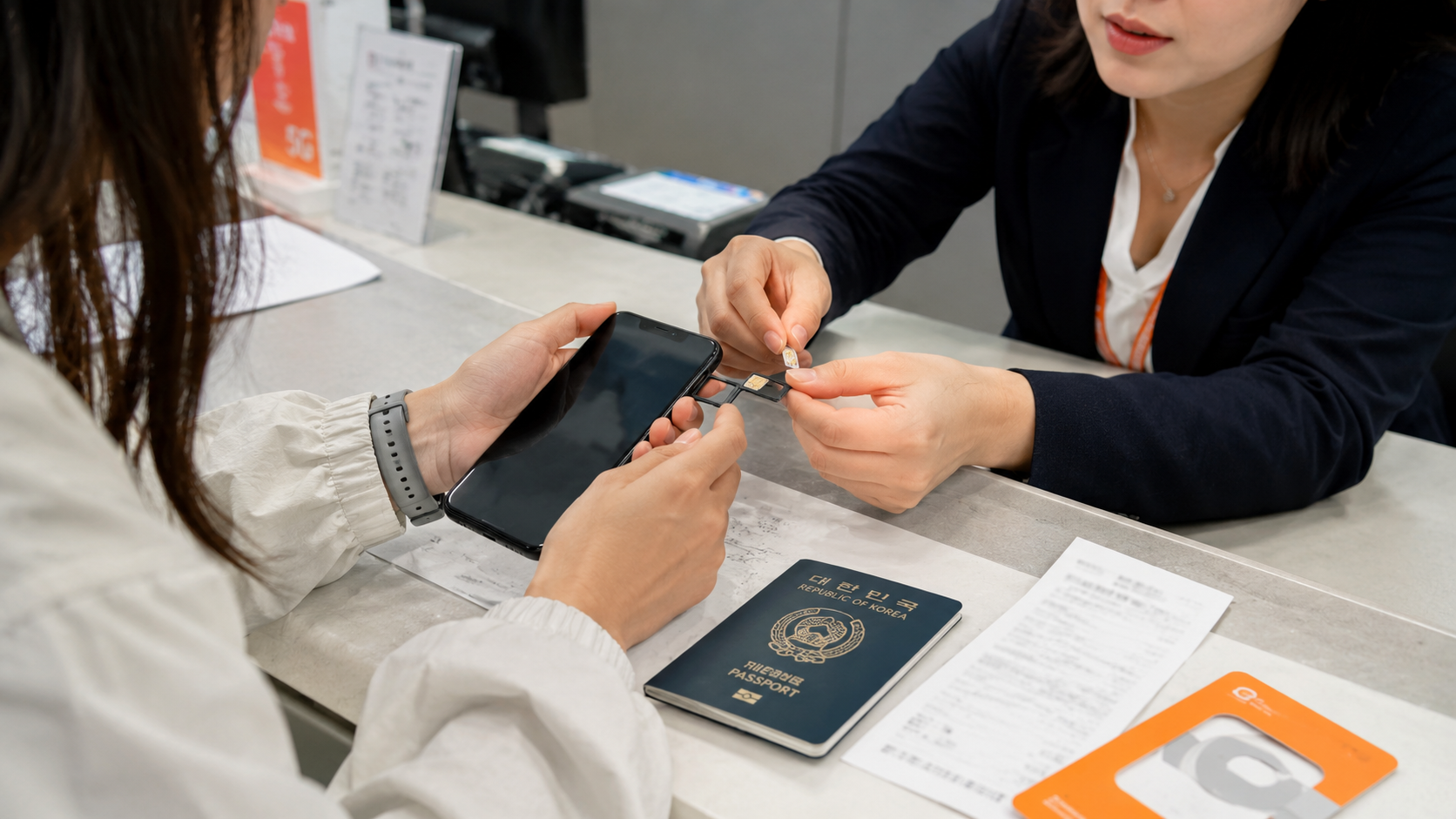
- Show your passport. The counter will register the SIM under the applicable tourist procedure.
- Confirm the total price in KRW. Check whether voice credit, a transport card, or another extra is included.
- Let the staff install the SIM. Keep your original SIM in a labeled holder or sealed pocket.
- Restart the phone if requested. The device may need to reconnect to the Korean network.
- Test mobile data with Wi-Fi switched off. Open a webpage or map using cellular data.
- Check the Korean number. Save it in your contacts and take a photograph of the package or contract information.
- Test an incoming call or text if needed. Do this before leaving the counter, especially if your reservations require a Korean number.
- Keep the receipt and support details. They may contain the contract number needed for extensions or troubleshooting.
Common mistakes to avoid
- Leaving before testing mobile data: A configuration or compatibility problem is much easier to fix at the counter.
- Buying data-only when you need SMS: Confirm whether the plan can receive and send texts.
- Expecting full Korean identity verification: A temporary tourist number generally cannot replace a resident-verified mobile account.
- Forgetting to unlock the phone: SIM compatibility and carrier locking are separate issues.
- Losing the original SIM: Put it somewhere more secure than a loose pocket.
- Selecting the wrong pickup terminal: Terminal 1 and Terminal 2 are separate buildings.
- Turning on home-line data roaming: On a dual-SIM phone, set the Korean line as the mobile-data line to avoid charges from your home carrier.
- Confusing a SIM purchase with pocket Wi-Fi rental: A physical SIM is usually yours to keep, while rented routers must be returned and may require a deposit.
What to check before you go
- Confirm your arrival terminal on the airline booking.
- Verify that your phone is unlocked.
- Check whether the device uses a physical SIM, eSIM, or both.
- Decide whether you need outgoing calls and SMS.
- Compare the official carrier prices and daily high-speed allowance.
- Read cancellation and refund conditions before reserving online.
- Save your reservation confirmation offline.
- Bring your original passport and an internationally enabled payment card.
- Ask your home carrier how to avoid roaming charges while retaining access to your normal number.
- Recheck the Incheon Airport facilities directory for current counter locations and hours.
FAQ
Are the Incheon Airport SIM counters open after midnight?
Yes. As verified on June 9, 2026, SK Telecom, KT, and LG U+ each have a 24-hour arrivals counter in both Terminal 1 and Terminal 2. Temporary closures or operational changes remain possible, so check the airport directory before traveling.
Is an airport SIM more expensive than buying one in Seoul?
Airport counters sell official tourist products with immediate passport registration, installation help, and testing. Different online sellers or city stores may offer other prices, but their activation rules and support can vary. Compare the total package, not only the headline daily rate.
Can I use a tourist SIM for KakaoTalk, Naver Map, or Kakao T?
Mobile data will support these apps. Features requiring an SMS code may require a plan with an active Korean number, while services demanding full identity verification may still be unavailable.
Can staff install the SIM for me?
Airport carrier staff commonly assist with installation and activation. Ask them to test mobile data and confirm the Korean number before you leave.
Which carrier should I choose?
All three are established Korean network operators. For a short visitor trip, the more useful comparison is the current package: validity, high-speed data allowance, throttled speed, voice support, price, and pickup location.
Sources
- Incheon International Airport facilities directory
- Incheon Airport Terminal 1 telecommunication facilities
- Incheon Airport Terminal 2 telecommunication facilities
- KT official tourist SIM information
- LG U+ official tourist SIM information
- SK Telecom official roaming products
Before leaving home, confirm your terminal and save the relevant 24-hour counter location on your phone. At the airport, have the staff test both data and any required calling or SMS functions before you continue to Seoul or another destination.